 Dutch
DutchInfrastructure documentation
Documenting an IT infrastructure is essential to maintaining a reliable, secure and effective IT environment. Without proper documentation, valuable knowledge about the IT infrastructure can be lost when systems managers leave the organization. Documenting preserves this knowledge and allows it to be transferred to new team members.
Documentation shows how an infrastructure is configured and how it is supposed to work, which helps with troubleshooting and maintenance tasks. And in the event of a disaster, documentation helps ensuring that the infrastructure can be restored to its previous state as quickly as possiible.
CMDB
The most basic form of documentation is having an inventory of all hardware, software, and networking components in the infrastructure. Often this inventory is stored in a Configuration Management Database (CMDB).
A CMDB should include the make and model of each component, as well as its location and function. Many CMDB tools provide the ability to correlate components, such as all the components needed to run an application. This can be very helpful when making changes or finding the root cause of an application failure.
Since the CMDB is needed as a basis for ITIL processes, it should be kept up to date as much as possible, using automated tools if possible.
Diagrams
A visual representation of the infrastructure can help a lot in understanding its topology. A topology diagram shows the relationships between different components and how they are connected.
There is no widely accepted formal standard for documenting IT infrastructures. Often Microsoft Visio or Diagrams.net diagrams are used to provide an overview of parts of the infrastructure, usually the network configuration and groups of servers. Although these diagrams necessarily omit many details, they can provide a general overview of the entire environment in one view.
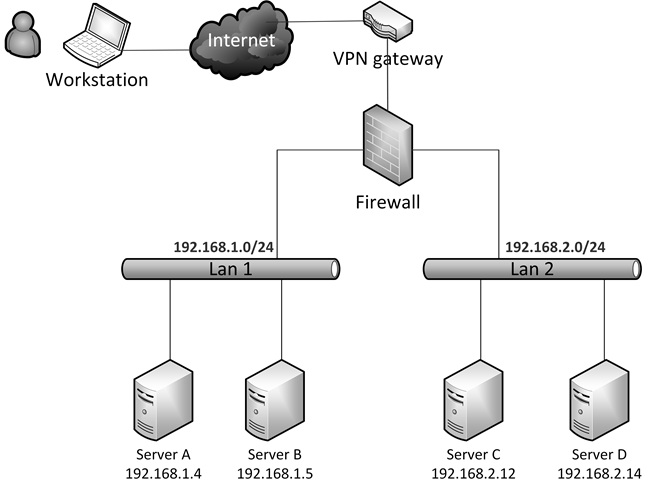
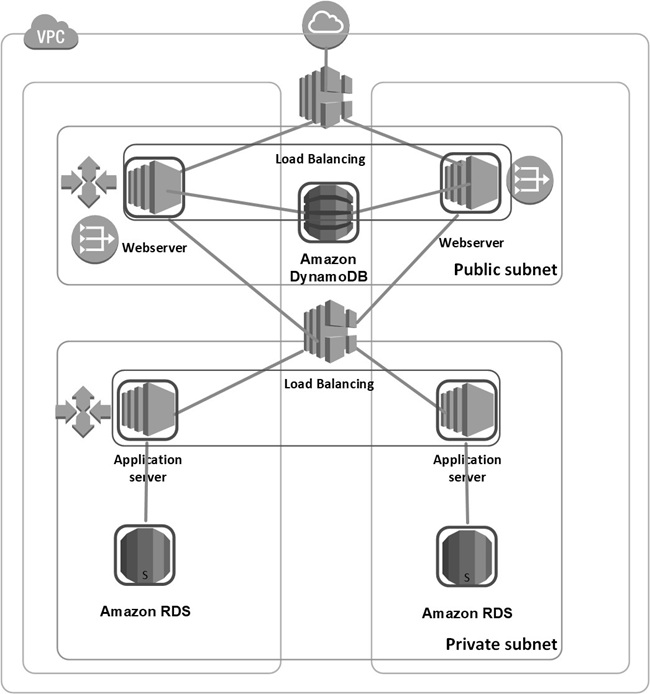
Tools such as Visio and Diagrams.net provide a comprehensive set of templates for infrastructure components, including servers, routers, firewalls, and components of public cloud environments.
The Enterprise Architecture modeling language ArchiMate includes a technical layer that can also be used to document infrastructures. ArchiMate is not an optimal way to document infrastructure, as it is designed to capture high-level concepts and relationships, rather than the detailed technical specifications that are important for documenting IT infrastructures. Also, ArchiMate is a complex modeling language that takes a lot of time and effort to learn and use effectively.
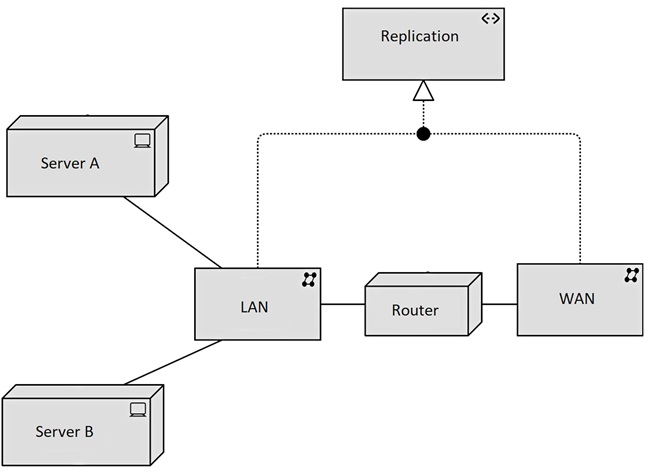
Please remember that pictures should always be explained to prevent readers from interpreting them themselves. Therefore, it is best to include the pictures in a document or (preferably) and set of wiki web pages in which the pictures are explained step by step. And it is important that this documentation, including the explanations, be updated with every change in the infrastructure.
IaC tools
Automation tools, such as IaC and configuration management tools can be used as a way to document how the infrastructure is built and the reason behind certain decisions. An important advantage of this method of documentation is that it can be done during modifications to the IaC code. For any future changes, the documentation in the code can easily be updated immediately.
A disadvantage is that the code must be read to get an understanding of the architecture of the infrastructure. It does not provide you with an instant overview of the setup, like diagrams do.
Below is an example of documentation in a Terraform code snippet.
############################################################
#  This VM is needed to run  the web server
############################################################
Resource "azurerm_windows_virtual_machine" "example" {
   name                  = "myvm1"
   location              = "northeurope"
   resource_group_name   = "MyRG"
   network_interface_ids = [ azurerm_network_interface.myvm 1 nic.id ]
   size                  = "Standard_B1s"
   admin_username        = "adminuser"
   admin_password        = "Password123!"

   ############################################################
   # The server must run the Windows Datacenter version
   # to ensure it is compatible with the application libraries
   ############################################################
   source_image_reference {
     publisher = "MicrosoftWindowsServer"
     offer     = "WindowsServer"
     sku       = "2019-Datacenter"
     version   = "latest"
   }

   os_disk {
     caching            = "ReadWrite"
     storage_account_type = "Standard_LRS"
   }
 }
Documenting procedures
At a minimum, written procedural documentation should include:
- Procedures for routine tasks, such as software updates
- An Infrastructure naming convention that describes how infrastructure components should be named
- An IP addressing plan that shows how IP addresses are distributed to devices based on the network architecture.
- A DNS naming convention that describes how DNS records should be named in the various network segments, such as internal DTAP segments and the DMZ.
- A fallback procedure that describes how to perform a fallback of the infrastructure to the secondary datacenter.
- A disaster recovery plan.
- Backup and recovery procedures.
Documentation should be updated regularly as changes are made to the infrastructure.
This entry was posted on Tuesday 16 December 2025

