A Quantum computer is a computer based on quantum mechanics. Quantum mechanics is a scientific theory that explains how tiny particles like atoms and electrons behave and interact with each other. Quantum mechanics deals with very small particles and operates on principles like probability and uncertainty.
A quantum computer does not use classical CPUs or GPUs, but a processor based on so-called qubits. A qubit (or quantum bit) is the basic unit of quantum information. Unlike classical bits, which can be either 0 or 1, qubits can exist in a superposition of states, representing multiple values simultaneously. This property enables quantum computers to perform certain tasks much faster than classical computers.
The number of qubits in a quantum computer is not comparable to the number of transistors in a CPU. The idea behind a quantum computer is that instead of calculating all the possibilities of a problem, a quantum computer can determine all the solutions at once. A problem with 1 billion possibilities can be computed with 30 qubits at once.
But computing is not the right word. Traditional computers are deterministic and quantum computers are probabilistic. Deterministic means that the result is predetermined, and every time a calculation is performed, the answer will be the same. Probabilistic means that there is a high probability that the result is correct, but that each computation is an approximation that may produce a different result each time. Because of the uncertainty inherent in quantum mechanics by definition, the answer is always an approximation.
Qubits are also highly unstable - they must be cooled to near absolute zero to become superconducting, and they can only hold a stable position for a few milliseconds. This means that calculations have to be repeated many times to get a sufficiently reliable answer.
Quantum computers are still in the experimental stage. A few research centers and large companies like IBM are working on them. Given the complexity and cooling requirements, quantum computing capabilities will most likely be offered as a cloud service in the future.
Quantum computing can be used in medicine, for example, it could speed up drug discovery and help medical research by speeding up chemical reactions or protein folding simulations, something that will never be possible with classical computers because it would take thousands of years to calculate on a classical supercomputer.
Because of its properties, quantum computing could easily break current encryption systems. Therefore, cryptographers are working on post-quantum algorithms.
IBM has built the largest quantum computer yet, with 433 qubits. This figure shows the progression of the number of qubits in the largest quantum computers.
This entry was posted on Thursday 20 April 2023
The Politico article "Biden admin's cloud security problem: 'It could take down the Internet like a stack of dominos'" argues that large cloud providers such as Amazon AWS, Microsoft Azure and Google GCP are too big to fail and that the U.S. government wants to regulate cloud provider security.
In recent years, many organizations have migrated their IT systems to large cloud providers. As a result, the collapse of these cloud providers - and the consequent failure of a range of government and corporate IT services - would cause enormous damage. A damage similar, or even greater, than that of the too big to fail banks.
A legitimate concern. The question, however, is how to manage this risk. The article on Politico argues that cloud servers have not proven as secure as government officials had hoped. It is unclear what this shows and what the expectations were. It is also unclear whether the alternative, bringing back in-house IT facilities, would lead to higher security.
I would venture to doubt that. By comparison, banks also sometimes have their money stolen by criminals. But is it better to keep your money in your mattress at home? Given the state of IT systems in the government, I would expect IT and security at cloud vendors to be in much better shape.
That hackers from countries like Russia use cloud servers from companies like Amazon and Microsoft as a springboard for attacks on other targets is nothing new and has little to do with the above. As a platform for attacks, the cloud is well suited. But that is independent of where the targets are located.
This entry was posted on Friday 17 March 2023
The last few weeks the news regularly reports about hackers who manage to steal data from public cloud environments, such as a recent hack at Amazon Web Services (AWS). The most common cause of this is the way in which customers have set up their security in the cloud, and not the security of the public cloud itself. The real security problem lies primarily in the way customers have set up their IT environments in the public cloud and how they keep them in order. An automated setup of cloud environments is of the highest importance to prevent security issues. In this blog I show you what cloud suppliers offer in terms of security, what is expected of customers and where things tend to go wrong.
Cloud suppliers put a lot of effort into security
The use of a cloud supplier compared to using your own data centre has a number of benefits. You don't need to invest a lot, you need fewer specialised administrators and the cloud supplier takes care of the physical security of the data center and the setup of the cloud platform.
Because cloud providers provide IT environments for a large number of customers from a wide variety of sectors (from the financial sector to healthcare), they have to meet the most stringent requirements. Cloud providers demonstrate their high level of security by ensuring that their data centers and practices meet the security standards generally accepted in the industries their customers operate in, such as PCI-DSS (financial sector) and HIPAA (healthcare). By comparison, for most organizations it is impractical and very costly to have external audits performed by in-house. Cloud providers can afford this with their economies of scale.
Security is a key issue for cloud providers
The market share, the number of data centers and the number of services of the three largest cloud providers - Google, AWS and Azure - is huge. They have a large number of data centers around the world with many hundreds of thousands of servers, large-scale storage and highly complex network environments. They have large teams in-house to handle specific aspects of security such as network security, encryption, identity & access management (IAM) and logging and monitoring. And with a large number of cloud vendor customers, every customer benefits from knowledge gained from other customers.
Cloud suppliers also have a lot to deal with when it comes to security - they only have a right to exist if there is no reason to question their security. If they make a mistake, they risk losing their credibility as a reliable partner.
A secure setup of the cloud is crucial
The underlying cloud platform may have a high level of security, but the design of cloud environments is a responsibility of the organization (the customer) itself. It is possible the customer has configured its security incomplete or incorrectly. To help their customers, major cloud providers have tools and automated services available to reduce the risk of errors.
By default, services in the public cloud are well protected. But in order to make use of services, they must be made accessible. And here things often go wrong. There are two reasons for this:
- The design of a cloud environment is different from what one is used to in an on-premises environment.
- A minor error can have very serious consequences - with a single click the customer environment can be made readable by the entire internet.
Setting up a cloud environment requires specialist knowledge. It really is a completely different platform than the traditional on-premises landscape, with many configuration options and new best practices. Customers must be able to use this new platform.
If a configuration error is made in such an environment without sufficient expertise, the effects can have a much greater impact than in an on-premises environment. For example, if the security of Amazon's S3 object storage is not configured properly, your data may become publicly accessible. A configuration error in an on-premises environment often has less far-reaching consequences.
Tools and automation are a good help
Fortunately, cloud providers provide a number of tools and services to reduce the risk of configuration errors. Problems can even be resolved automatically. For example, cloud providers provide scripts that can be launched automatically to shut down global readable data storage automatically and then alert you. I would strongly recommend using the available tooling as much as possible so when there is a configuration error, you will be informed as soon as possible.
In addition, it is of the greatest importance not to make manual changes in a cloud environment, but to make use of as much automation as possible. By using templates and scripts, components in the cloud can be implemented automatically and unambiguously.
Securing the public cloud is a shared responsibility
Public cloud environments have a very high security standard, where access to cloud components is locked by definition. It is the responsibility of the cloud provider to keep its platform secure. But it is the responsibility of the organization to ensure the security of the configuration of the cloud. The security of the public cloud is a shared responsibility. Be aware that a small error in the cloud can have far-reaching consequences, use the available tools and ensure maximum automation; after all, scripts do not make mistakes, but people do.
This blog first appeared (in Dutch) on the CGI site.
This entry was posted on Thursday 17 January 2019
Until recently, most servers, storage, and networks were configured manually. Systems managers installed operating systems from an installation medium, added libraries and applications, patched the system to the latest software versions, and configured the software to this specific installation. This approach is, however, slow, error prone, not easily repeatable, introduces variances in server configurations that should be equal, and makes the infrastructure very hard to maintain.
As an alternative, servers, storage, and networks can be created and configured automatically, a concept known as infrastructure as code.
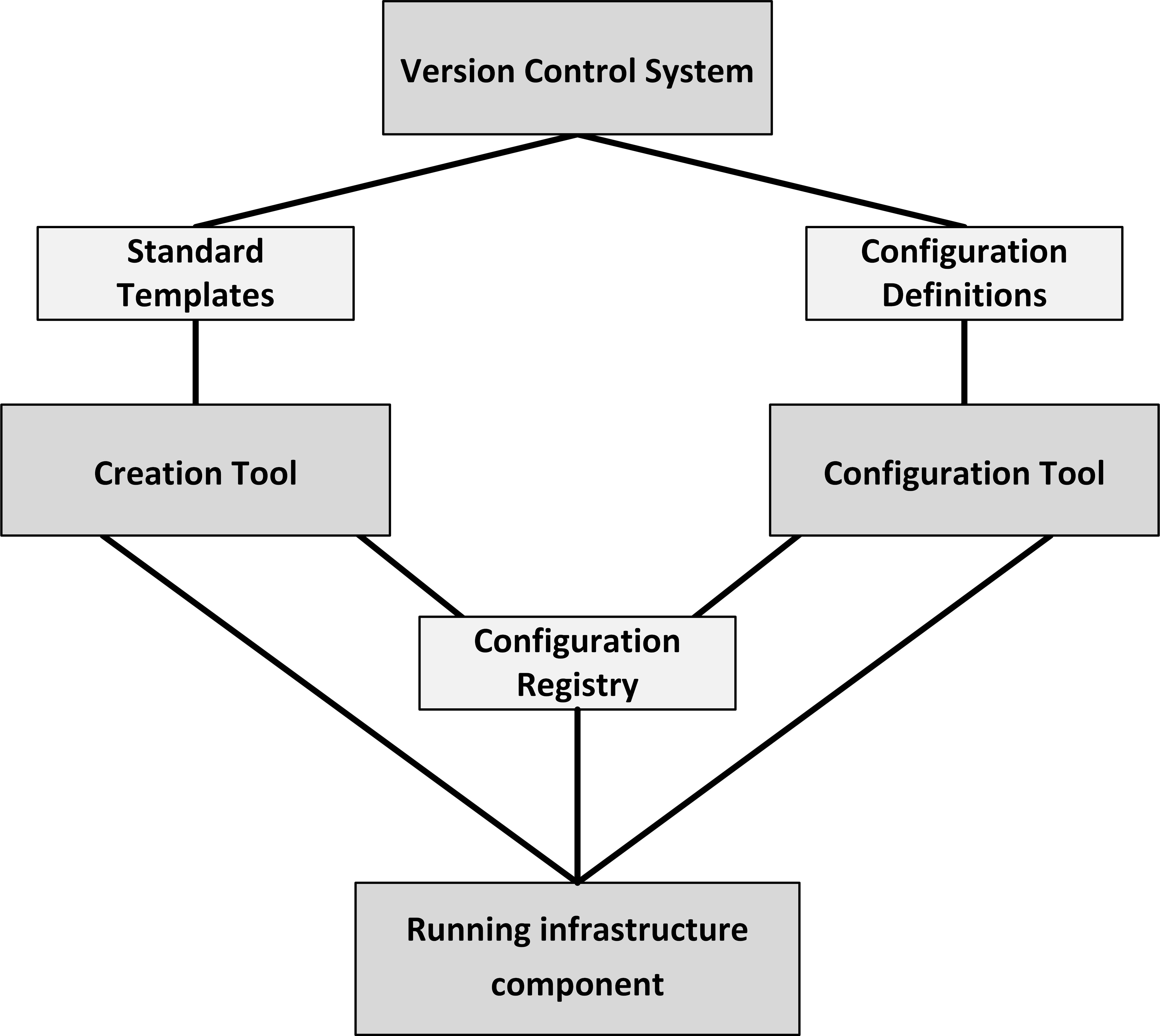
The figure above shows the infrastructure as code building blocks. Tools to implement infrastructure as code include Puppet, Chef, Ansible, SaltStack, and Terraform. The process to create a new infrastructure component is as follows:
- Standard templates are defined that describe the basic setup of infrastructure components.
- Configurations of infrastructure components are defined in configuration definitions.
- New instances of infrastructure components can be created automatically by a creation tool, using the standard templates. This leads to a running, unconfigured infrastructure component.
- After an infrastructure component is created, the configuration tool automatically configures it, based on the configuration definitions, leading to a running, configured infrastructure component.
- When the new infrastructure component is created and configured, its properties, like DNS name and if a server is part of a load balancer pool, are automatically stored in the configuration registry.
- The configuration registry allows running instances of infrastructure to recognize and find each other and ensures all needed components are running.
- Configuration definition files and standard templates are kept in a version control system, which enables roll backs and rolling upgrades. This way, infrastructure is defined and managed the same way as software code.
The point of using configuration definition files and standard templates is not only that an infrastructure deployment can easily be implemented and rebuilt, but also that the configuration is easy to understand, test, and modify. Infrastructure as code ensures all infrastructure components that should be equal, are equal.
This entry was posted on Thursday 18 May 2017
DevOps is a contraction of the terms "developer" and "system operator". DevOps teams consist of developers, testers and application systems managers, and each team is responsible for developing and running one or more business applications or services.
The whole team is responsible for developing, testing, and running their application(s). In case of incidents with the applications under their responsibility, every team member of the DevOps team is responsible to help fix the problem. The DevOps philosophy is “If you built it, you run it”.
While DevOps is typically used for teams developing and running functional software, the same philosophy can be used to develop and run an infrastructure platform that functional DevOps teams can use. In an infrastructure Devops team, infrastructure developers design, test, and build the infrastructure platforms and manage their lifecycle; infrastructure operators keep the platform running smoothly, fix incidents, and apply small changes.
This entry was posted on Friday 06 January 2017
 Dutch
Dutch