According to IBM, every day 2.5 quintillion bytes of data are created, and 90% of the world’s data is created in the past two years. Because of the popularity of sensors, mobile telephony, surveillance cameras, RFID tags, social networks, digital photographs and video, etc. the amount of generated data getting larger each day.
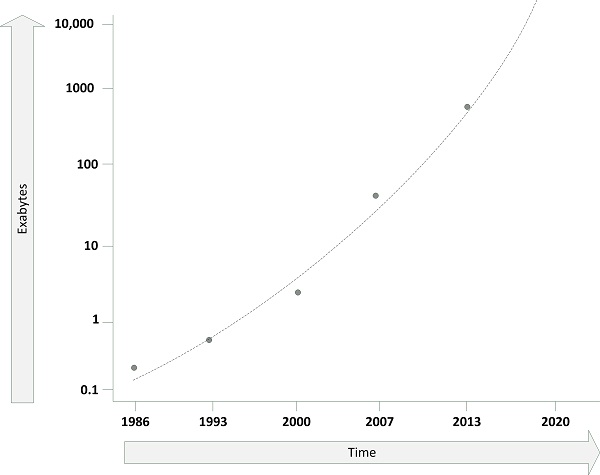
The annual world's effective capacity to exchange information through telecommunication networks is shown in the next picture, where one Exabyte is one billion Gigabytes.
Figure: Big data
Most of this data is unstructured, meaning that the data is not stored in databases, but in emails, text documents, spreadsheets, etc.. To make efficient use of this data is quite a challenge. In some cases, the amount of data coming into an organization is too large to even store.
Big data is about the search, processing and storage of data that is increasing in volume, velocity (the speed at which data is transported through a system), and variety (the types of data) – also known as the three Vs.
One example is the LOFAR telescope, that generates an enormous amount of data each second. Too much to store it on disks. So the only way to process the data is when it is still in transit. The live data stream is processed and only the result of this processing – that is much smaller in size – is actually stored on disk to be analyzed.
New infrastructure solutions are needed to cope with big data, including high speed networks, fast processing nodes, and specialized storage.
This entry was posted on Monday 31 December 2012
In general, green IT aims to reduce the effects on the environment that are the result of using IT. In the realm of IT infrastructure, it typically comprises electricity usage and carbon dioxide (CO2) emissions.
Datacenters consume up to 1.5% of all the world's electricity and (according to a study by Gartner) IT accounts for approximately 2% of all the world’s CO2 emissions. This is approximately the same amount as all airplanes combined.
There are a number of drivers organizations have to aim for green IT, like publicity – We are a green company – or actual care for the environment. But most organizations want green IT for one reason only: saving money.
The amount of money that can be saved by implementing green IT can be substantial. For instance, the amount of money spent on electricity during the lifetime of a server can be much higher than the cost of the server itself. The price of electricity has raised with 50% between 2007 and 2012, and the electricity bill will probably only go up in the forthcoming years.
It is important to know who pays the electricity bill in an organization. In most cases, the facilities department pays the electricity bill, not the IT department. Often systems managers and architects know pretty well how much a server costs, but they rarely have a clue about the cost of electricity. Do you know how much one kWh cost for your organization?
There are basically three ways to make the IT in your organization greener:
- Use better equipment
- Enhance the efficiency of the datacenter
- Use less resources
In the next sections these are explained.
Use better equipment
PCs
An average desktop PC with an old-fashioned 17” CRT monitor consumes about 200 watts of electricity. In one year, with 1900 working hours, this comes down to 380 kWh, which cost approximately $38 per year per PC (given an average price of $0.10/kWh).
So, an organization with a thousand of these PCs spends $38,000 per year on electricity alone.
When the CRT monitors are replaced by LCD displays (which consume about 50 watt less energy), the cost will go down with approximately $9,000 (each year!). Most laptops use about 15-60 watts, far less than desktops, which can lead to even more cost reductions.
This is important, as there are approximately 50 million servers in the world and more than one billion PCs. It therefore often makes more sense to get more power efficient PCs than to optimize the datacenter.
Datacenters
Some significant savings can be made in the datacenter as well, for instance by:
- Using blade servers – Because of the shared use of power supplies and other parts, blade servers use approximately 30% less power than equivalent rack-mounted servers.
- Using flash disks instead of rotating disks – Because flash disk have no moving parts they use much less power than rotating disks. And when flash disks are not used, they use no electricity at all, as opposed to rotating disks, that must rotate 24/7.
- Upgrading old servers– Every year manufacturers offer more power efficient equipment. It is good practice to upgrade servers in the datacenter every few years to benefit from this.
- Using low power hardware – Where possible try not to use the most power-hungry servers. For example, an Intel Atom CPU uses 30 watts, while a high-end CPU uses 200 watts. Most CPU manufacturers aim at getting the same CPU power for less electricity usage each year.
Enhance the efficiency of the datacenter
Apart from the power used by the IT infrastructure components in the datacenter, the datacenter itself uses power as well. Most of this power is used by the cooling system, but power is also needed for lighting, heating of the operator rooms, etc..
To measure the power used by the datacenter the Power Usage Effectiveness (PUE) metric is most used. In a white paper published by the Green Grid in February 2007 called "Green Grid Metrics: Describing Data Center Power Efficiency" the use of the PUE metric was introduced.
The PUE is calculated by dividing the amount of power used by the datacenter, by the power used to run the IT equipment in it. PUE is therefore expressed as a ratio, with efficiency improving as the metric decreases towards 1.
For example, running a datacenter with a PUE of 2 means that for each watt of power used by the IT equipment an extra watt is used by the rest of the datacenter. This means that if this datacenter has 1 MW of IT components installed, another MW is “wasted” by the datacenter (mainly for cooling, which does not directly lead to better or more customer service).
In this example, with an average electricity cost of $0.10 per kWh, every year 1000 kW * 24 hours * 365 days * $0.10 = $876,000 is spent on running the datacenter alone (not including the actual IT equipment)!
In this example by optimizing the datacenter’s power usage to a PUE of 1.5 almost half a million dollar per year can be saved.
Over the years the trend has been to decrease the PUE from more than 2 a few years ago to a typical value of 1.8 to 1.5 today. Google claims its datacenters reach a PUE of 1.22, and a Facebook datacenter built in 2011 even claims to reach a PUE of only 1.07, as a result of cooling optimizations and large scale operations.
The best way to lower the PUE of a datacenter is to implement efficient cooling systems.
It is important to understand that PUE only measures datacenter power efficiency, and not for instance server efficiency, the efficiency of the power supplies used, let alone the amount of useful work that is done by the IT equipment!
Another thing to remember is that a high PUE is not always bad. If a datacenter uses its IT infrastructure components very efficiently, for instance by virtualizing all servers to a few large physical systems, much energy is saved compared to using many individual servers. The PUE, however, will be relatively high as much cooling is needed for the fully loaded physical machines.
Use less resources
A very simple way to be more green is to use less resources in the first place. Some examples are explained in this section.
Print only when needed. And if printing is needed, use two-sided printing.
Switch off unused equipment. Use screensavers with a black screen to automatically switch off monitors. Switch off PCs during the night.
I once worked at a large client with 20,000 PCs. These PCs were not only old (and hence very power-hungry), but start-up of these PCs took a long time. Having to wait for fifteen to twenty minutes to fully startup a PC was no exception. The result was that people tended to keep their PCs on all the time. While they worked eight hours a day, their PCs were kept on for twenty-four hours. Most people even let them on during the weekends. After replacing all PCs with more modern ones, the power bill went down considerably and the world is not a little bit greener.
Using virtualization, the number of physical machines can be reduced. And when servers are not used (for instance during the evenings), the virtualization software can move all running virtual machines to fewer physical machines and automatically switch off the rest of the physical machines.
Rationalization of the server pool can also help – I have seen occasions where servers were running, but no one knew what they actually were used for. And since everyone was afraid to switch them off, they kept on running for years, possibly doing nothing at all.
This entry was posted on Friday 28 December 2012
Cloud computing is one of the most hyped paradigm shifts in computing in recent years. Many definitions of cloud computing exist, but they boil down to these criteria:
- Use of shared resources – Instead of providing each application with a fixed amount of processing power and storage, cloud computing provides applications with resources from a shared pool. This is typically done using virtualization technology.
- On demand use – A cloud is able to quickly scale up and down in term of resources. When temporarily more processing power or storage is needed, for instance because of a marketing campaign, the cloud can scale very quickly to the demand. When resource demand goes down, the cloud resources can scale down as well.
- Pay per use – In a cloud environment actual usage of resources is billed. There are no capital expenses, only operational expenses. This in contrast with the investments needed to build a traditional datacenter.
- Customer self-service – Because of optimal automation minimal systems management effort is needed to deploy systems or applications in a cloud environment. In most cases, end uses can deploy, start and stop systems or applications themselves.
It is important to realize that cloud computing is not about technology, it’s a business model. It enables organizations to cut cost while at the same time focusing on their primary business – they should run a business instead of a mail server.
Be aware that when using an cloud based solutions, the Internet connection becomes a Single Point of Failure. Internet availability and performance becomes critical and a redundant connection is therefore crucial.
The cloud model
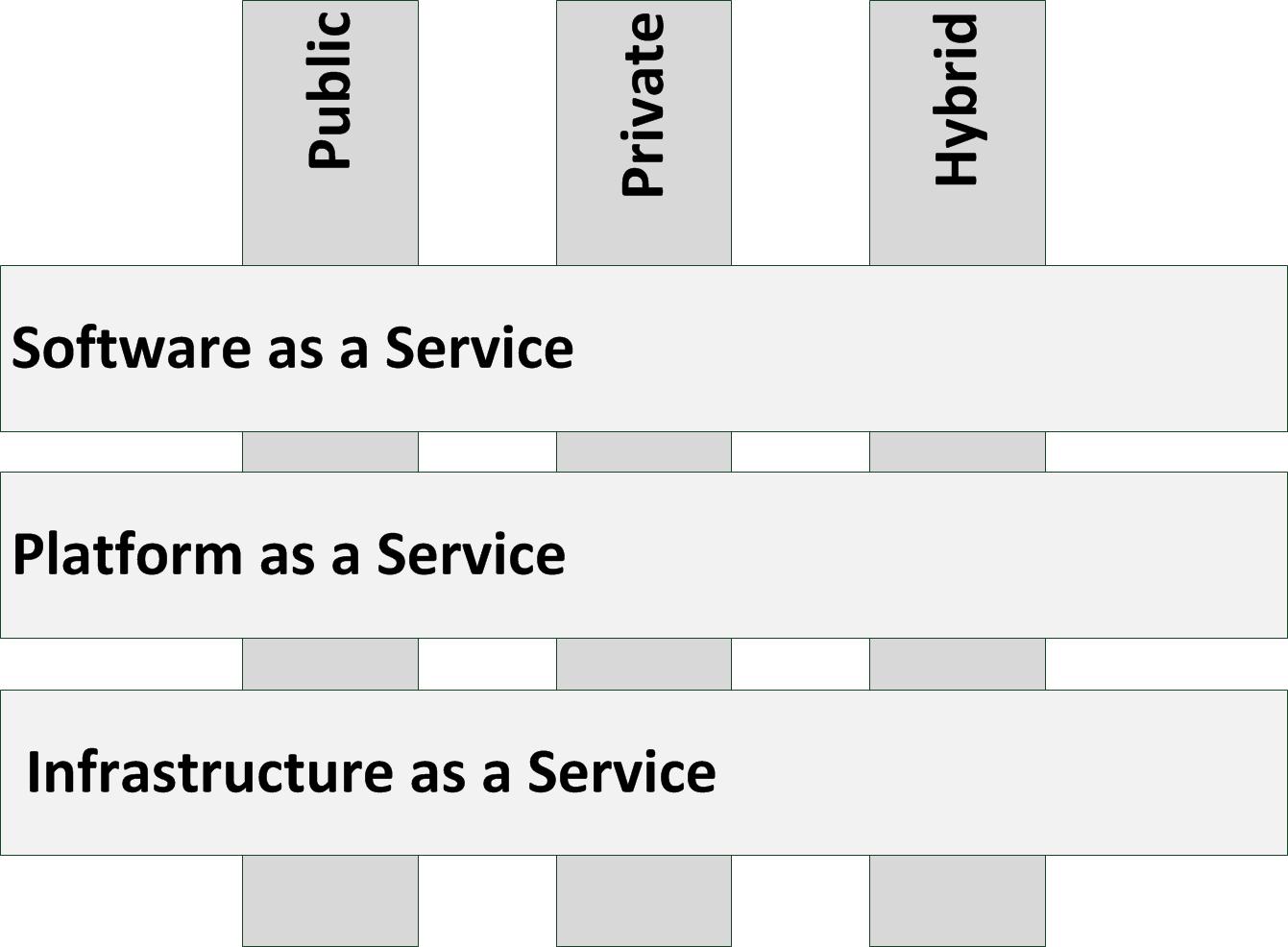
Cloud computing can be divided into three service models and three deployment models, as shown in the next figure.
Figure: Cloud computing
Deployment models
- A public cloud deployment model is what most people mean by cloud computing. A public cloud is delivered by a cloud service provider (CSP), is accessible through the Internet, and available to the general public. Because of the typical large customer base public clouds largely benefit from economies of scale.
- A private cloud is operated solely for a single organization, whether managed internally or by a third-party and hosted internally or externally. It extensively uses virtualization and standardization to bring down systems management cost and staff. As a rule of thumb, a private cloud is cost effective when more than 300 servers are hosted.
- In a hybrid cloud deployment, one part of a service or application is provided by a public cloud, while another part is provided by a private cloud. This enables putting generic services (like email servers) in the public cloud while hosting specialized services (like a business specific application) in the private cloud. Hybrid clouds provide the flexibility of in house applications with the fault tolerance and scalability of public cloud based services.
Service models
- Software-as-a-Service (SaaS) delivers full applications, that need little or no configuration. Examples are Hotmail, Linked-in, IBM Lotus Live, Facebook, Yammer, Twitter, Google Apps, and Salesforce.com.
- Platform-as-a-Service (PaaS) delivers a scalable, high available, and open programming platform that can be used to build bespoke applications upon. Examples are Microsoft Azure and Google App Engine.
- Infrastructure-as-a-Service (IaaS) delivers (virtual) servers, networking, and storage. Examples are Amazon Elastic Cloud (EC2), Terramark, and Rackspace.
Infrastructure as a Service (IaaS)
Infrastructure as a Service only provides servers (typically virtual machines), storage, networking and the systems management tools to manage these. In order to use IaaS, users must create and start a new server, and then install an operating system and their applications.
Since the cloud provider only provides basic services, like billing and monitoring, the user is responsible for patching and maintaining the operating systems and application software.
The main advantage of IaaS is that organizations don’t have to invest in hardware and a datacenter, and they only pay what they use. They still need their own system administrators though.
Be aware that not all operating systems and applications can be used in a IaaS cloud; many software licenses prohibit the use of a fully scalable, virtual environment like IaaS, where it is impossible to know in advance on which machines the software will run.
This entry was posted on Sunday 23 December 2012
Most IT projects require the procurement of hardware, software, or services. The purchase process entails determining what is needed, getting an offer, ordering, delivery, warranty and renewal. Each of these topics is described in the following sections.
Determine what is needed
Before any purchase can be made, it must be crystal clear what is actually needed. In most cases, a Bill of Materials (BoM) is made that includes part numbers of all items. It is a good practice to work with a supplier to get the BoM right the first time. The supplier can verify that all needed items are on the BoM, including small stuff, like cables, connectors, and mounting brackets.
Apart from the bill of materials, typically a Statement of Work (SoW) is made. A SoW describes what the supplier will do, apart from delivering the goods. For example, do we expect the supplier to build up a rack, place it in the datacenter, connect it to the power supply, label the cables, etc.? It must be clear from the start who does what to mitigate the risk of misunderstanding.
The supplier can also have specific requirements. For instance, is a loading dock available to deliver goods to the datacenter, or is the elevator large enough to lift the equipment to the final destination? Do not forget to ask for these supplier requirements!
Getting an offer
In a large organization, the lead time for the internal procurement process can be several weeks, or even longer. This lead time is due to the time it takes to find a supplier, to handle contract issues or to get signatures from management to instantiate the order. Often, after getting an offer from a supplier, procurement will try to get discounts, which could delay the process. So, check as soon as possible how long this process will take, to adjust the project planning accordingly.
It must be noted that apart from the lead time to get an offer, it typically takes four to eight weeks for the supplier to deliver the goods.
Choice of suppliers
Most organizations use preferred suppliers for standard purchases. Having a small set of preferred suppliers makes the purchase process easier – contracts are already in place, and discounts can be negotiated because of large volume purchases.
In practice, organizations often choose for a Microsoft and SAP unless policy for their software stack: when possible all software is either purchased from these suppliers, or built based on technology from these suppliers. Using a standard product line from one supplier eases integration of components. The alternative is using a best of breed landscape, where each component is chosen based on the best quality or the most comprehensive feature set. Sometimes an organization chooses a standard software stack for commodity components (like office tools, file and web servers, CRM systems and email servers), and best of breed products for highly specific tasks, that are close to the core business processes.
With hardware, predefined choices are typically made as well. For instance, all network equipment is from Cisco and all servers are from HP. One reason for this is easier management of support contracts – when a hardware component fails, one telephone number to the supplier’s support desk can be called to start the repair process. Another reason is to limit the knowledge needed in the organization to manage the components.
Having preferred suppliers can lead to a vendor lock-in; after some time it becomes unfeasible to change suppliers because of practical reasons. If all hardware is from Dell, for instance, then changing to another supplier – like IBM – is not good economics. The resulting lack of competition can lead to a higher price level in the long run and to a decrease in service levels. I have seen this in practice, where the preferred supplier was asked to deliver something and he just said no. The client had no choice but to say “okay then…”.
Bidding and tendering
Getting an offer may involve a bidding process, also known as tendering. For instance, a company policy could state that any purchase over $100,000 requires a bidding process. If the cost of a product or service is over this threshold, a rigid purchase process must be followed. The reason for a bidding process can also be a regulation requirement; for instance, many public sector organizations require a bidding process for large purchases.
In general a bidding process comprises the following steps:
- RFI – Request for Information. In this step a large group of suppliers is asked to inform the purchase department if they are capable of providing the required goods or service. This step involves writing an RFI document and giving the suppliers time to respond. An RFI process typically takes two to four weeks.
- Short list. In this step, based on the RFI responses, the purchase department creates a short list of suppliers that are most likely to be able to deliver the goods for a good price and with good service. A short list comprises typically three to five suppliers.
- RFP – Request for proposal. In this step the suppliers in the short list are requested to make a proposal for the delivery. A full list of requirements is provided to them, including a draft statement of work. The suppliers typically get three to ten weeks to respond with an offer and a description of how they propose to provide the goods and/or services. There are often strict rules about the time table and the form in which the response must be given (for instance, all responses must be delivered in three-fold, before a certain date and time in person to the head of purchasing).
- Questions and clarification. In this step, which is planned between the publication of the RFP and the supplier’s responses, the suppliers are given the opportunity to ask questions about the RFP (in writing), in case something is unclear or in case multiple options to fulfill a requirement exist. Usually, these questions and the answers are communicated to all suppliers on the short list. Most suppliers are therefore hesitant to answer questions, because it reveals parts of their offer to other suppliers.
- Offer. Often at the latest possible moment the suppliers provide the answers to the RFP, including an initial offer. The purchase department checks the offers on completeness (are all questions answered, is the appropriate procedure followed) and price.
- Terms and conditions negotiations. Next, the purchase department starts negotiations with the suppliers that provided the best response to the RFP – the preferred suppliers, mostly two of them. The terms and conditions of the delivery, including payment terms, warranty conditions, and discounts are discussed with them.
- BAFO - Best and final offer. In this step the preferred suppliers make a final price and SoW, which is their last chance to change the offer.
- Award. Based on the BAFO, the purchase department awards the supplier with the deal and the supplier can start to deliver.
As this list implies, this process can take a long time. I have been in such a process several times, and it is very time and energy consuming, both for the supplier and for the purchase department. At one occasion I was in a complex RFI/RFP process that took two years to complete!
Ordering
Ordering is mostly done by the purchasing department. They place the order and monitor the delivery time. When the order entails multiple delivery dates, a choice can be made to deliver the goods in partial deliveries or to deliver the goods in one delivery, but at a later date.
Because the delivery time is often weeks after the purchase order is placed, it makes sense to start ordering the goods as early as possible in the project.
Delivery
Some time after placing the order, the goods are delivered. For hardware, it is good practice to inform the department or person that has to physically receive the delivery well in advance. Beware that the person that physically receives the goods, is not always the one formally accepting the delivery.
The formal acceptance must be done by someone who is entitled to do so, often someone from the project that asked for the goods, or someone from the purchasing department. Before signing for delivery, check the boxes for any damage and check for completeness of the delivery!
Warranty
Typically a warranty period is one year for hardware and two months for projects. During the warranty period, defects will be fixed without additional cost. For projects, most of the time the project team will be gone after warranty period as well.
Renewal
When purchased goods are used for some time, they might need renewal. Hardware is often used for three to five years before it is replaced, and software typically has releases every few years. Service contracts are also often agreed upon for just a few years.
Sometimes a renewal of the hardware, software licenses, or service contracts leads to a new project.
Systems management should have Life Cycle Management implemented to handle the renewal, as each piece of hardware and software has its own life cycle. Renewal of service contracts is often managed by the purchase department.
This entry was posted on Tuesday 18 December 2012
An Intrusion Detection System (IDS) or Intrusion Prevention System (IPS) detects and – if possible – prevents activities that either compromise system security, or are a hacking attempt. An IDS/IPS monitors servers or the network for suspicious (and possibly hostile) activity and alerts the systems manager when these activities are detected.
A typical example of an IDS/IPS alert is the occurrence of a port scan, often used by hackers to find vulnerabilities in Internet-attached devices.
An IDS monitors a server or a network and provides alerts when something suspicious happens. An IPS, however, can also stop attacks by for instance changing firewall rules on the fly to block detected unwanted traffic. IPS systems are often combined with firewall functionality or have a direct interface to it. Two types of IDS/IPS systems exist: Network based IDS (NIDS) and Host based IDS (HIDS)
- A NIDS is typically placed at a strategic point within the network to monitor traffic to and from all devices on that network. A good place would be a central firewall, a core switch or a DMZ router. The NIDS is not part of the network flow, but just “looks at it”, to avoid detection of the NIDS by hackers.
- A HIDS runs on individual servers or network devices, where it monitors the network traffic of that device. It also monitors user behavior and the alteration of critical (system) files. A good place for a HIDS is a critical (production) server, or a server that can be reached from the Internet, like a webserver, an email server or an FTP server.
An IDS system works in one of two ways:
- Looking for specific signatures of known threats; similar to the way antivirus software works (also known as a statistical anomaly-based IDS)
- Comparing traffic patterns against a baseline and looking for anomalies (also known as a Signature-based IDS)
This entry was posted on Friday 14 December 2012
IPv4 addresses are composed of 4 bytes (32 bits), represented by 4 decimal numbers, for example, 192.168.1.1. Each host (server, switch, router, firewall, etc.) in the IP network needs at least one IP address. Within a network all IP addresses must be unique.
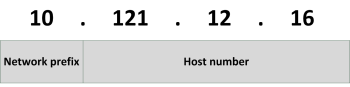
An IP address consists of two fields, a network prefix and a host number. For instance, in the IP address 10.121.12.16, the network prefix is 10 and the host number is 121.12.16.
All hosts in the same network can communicate directly to each other. Hosts in other networks can only be reached using a router. For example, consider the following three hosts:
Host A IP address: 192. 168. 1. 1
with subnet mask: 255. 255. 255. 0
is in network: 192. 168. 1. 0
with broadcast address 192. 168. 1. 255
and is host number 1 in that network
Host B IP address: 192. 168. 3. 4
with subnet mask: 255. 255. 255. 0
is in network: 192. 168. 3. 0
with broadcast address 192. 168. 3. 255
and is host number 4 in that network
Host C IP address: 192. 168. 3. 8
with subnet mask: 255. 255. 255. 0
is in network: 192. 168. 3. 0
with broadcast address 192. 168. 3. 255
and is host number 8 in that network
To have host B (192.168.3.4) and C (192.168.3.8) communicating with each other no routing is needed since both hosts are in the same network (192.168.3.0).
To have host A (192.168.1.1) and B (192.168.3.4) communicating with each other, however, a router must be setup to route packets between networks 192.168.1.0 and 192.168.3.0. It is important to note that routers route packets between networks (sets of IP addresses) and do not route between individual IP addresses.
The first three bits of the first byte of an IP address define the class of the address. Three classes of networks are defined:
In a typical class C address like 195.23.221.23, the network is 195.23.221 and the host number is 23.
|
Class
|
First byte
|
Max number of hosts
|
Number of available networks
|
|
A
|
0–127
|
16,777,214
|
128
|
|
B
|
128–191
|
65,534
|
16,384
|
|
C
|
192–223
|
254
|
2,097,152
|
This means that the IP address 170.32.43.12 is a class B network. This network can have 65,534 hosts in it. The problem is that there are only 16,384 class B networks available worldwide, and only 128 class A networks. Only very large companies (like IBM) and some governments own a class A network, all other organizations sometimes use a class B, and mostly use a class C network.
Classful network design served its purpose in the startup stage of the Internet, but it lacked scalability in the face of the rapid expansion of the network in the 1990s. For instance, when an organization only needs five hosts in their network, they needed to get a class C network, even if they used only five of its 254 available host addresses.
To solve the problem of this inefficient use of IP addresses the class system of the address space was replaced with Classless Inter-Domain Routing (CIDR) in 1993. CIDR is based on variable-length subnet masking (VLSM) to allow allocation and routing based on arbitrary-length prefixes. This system is also known as subnetting.
Subnetting
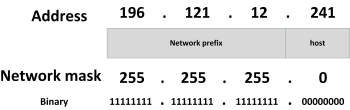
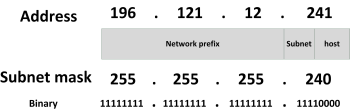
Subnetting is used to split up the host part of an IP network in smaller subnets, each forming a new IP network. Consider the following example:
In this case, the IP address 196.121.12.241 has a network prefix of 196.121.12 and a host number of 241 (in the host range between 1 and 254).
For IPv4 a network mask is a 32-bit number (expressed in four decimals) where bits set to 1 signify the network prefix and bits set to 0 the host part of the address. Essentially to get the network address from an IP address the IP address and the subnet mask are ANDed together, to get the host part the IP address and the negated subnet mask are ANDed together. The default subnet mask of a class C network is 255.255.255.0.
As an alternative, the routing prefix can also be expressed in Classless Inter-Domain Routing (CIDR) notation. It is written as the address of a network, followed by a slash character (/), and ending with the bit-length of the host space. For example, 255.255.255.0 is the network mask for the 192.168.1.0/24 notation.
Now consider the following example using a subnet:
In this case, the IP address 196.121.12.129 has a network prefix of 196.121.12, a subnet of 240 and a host number of 1 (in the host range between 1 and 14).
Using subnets, the available IP address space can be used much more efficiently, as unused host addresses are simply not reserved or wasted. In the next table, the number of hosts that can be used is shown for certain subnet masks.
|
CIDR prefix
|
Subnet mask
|
Available subnets
|
Hosts per subnet
|
|
/24
|
255.255.255.0
|
1
|
254
|
|
/25
|
255.255.255.128
|
2
|
126
|
|
/26
|
255.255.255.192
|
4
|
62
|
|
/27
|
255.255.255.224
|
8
|
30
|
|
/28
|
255.255.255.240
|
16
|
14
|
|
/29
|
255.255.255.248
|
32
|
6
|
|
/30
|
255.255.255.252
|
64
|
2
|
|
/31
|
255.255.255.254
|
128
|
2 (only point-to-point)
|
To directly connect two routers with each other, a subnet with 4 addresses is needed (each router needs one IP address, plus the subnet needs a broadcast address and a network address), leading to a subnet mask of 255.255.255.252. Point/to/point connections need no broadcast or network address and can use a subnet mask of 255.255.255.254.
Using subnets allows Internet Service Providers to for instance provide 32 organizations with six public IP addresses each and only using one class C IP network for it.
To maximize the number of IP addresses available in the various LAN segments in an internal network and to minimize the size of routing tables in routers, a well-designed IP addressing plan is needed. In such an addressing plan the available IP ranges are divided in various subnets, each with its own set of users.
Private IP ranges
Since the number of unique IP addresses on the Internet is limited and because hosts with public Internet IP addresses can reach the internet directly, private IP addresses should be used for LANs instead. The following IPv4 address ranges can be used for internal use – so-called private IP address ranges:
- 10.0.0.0 to 10.255.255.255 (class A address range)
- 172.16.0.0 to 172.31.255.255 (class B address range)
- 192.168.0.0 to 192.168.255.255 (class C address range)
These IP addresses are not used on the Internet and by default they are not routed by Internet routers. This means each organization can use these IP ranges internally without introducing conflicts on the Internet. It is a good practice to create separate subnets within the chosen address range for:
- Production environment workstations
- Production environment servers
- Office environment workstations
- Office environment servers
- Development and test environments
- De-Militarized Zone
- Systems management network segment
- Printers
- Remote users
- Server clusters
- Guest users’ workstations
Routing between these subnets should be done using routers with access-lists, to block undesired network traffic.
This entry was posted on Friday 07 December 2012
My book is used by a number of universities in the USA, as part of their IT architecture curricula. The book is especially suited for courses based on the IS 2010.4 curriculum.
Based on requests from two university professors I created a small set of course materials. It contains all pictures I created for this book in both Viso and high-resolution PNG format, and a small PowerPoint slide deck I used in a talk for the Dutch community of information architects.
The course materials can be downloaded here.
This entry was posted on Thursday 06 December 2012
 Dutch
Dutch